

Hi everyone,
We’re excited to announce that the G600 is back and now available through our beta program in Hub version 1.2.6.
To access the G600 Basic PFD profile, please ensure you are running Hub version 1.2.6. Then, click the gear icon in the Hub and enable Beta Releases. After restarting the Hub, you’ll see a new profile titled “G600 Basic.”

Please test the G600 Basic profile this week as we prepare for a public release (targeting this or next week). Let us know if any issues.
We’d also love to hear what features you’d like to see next. Our current priorities include:
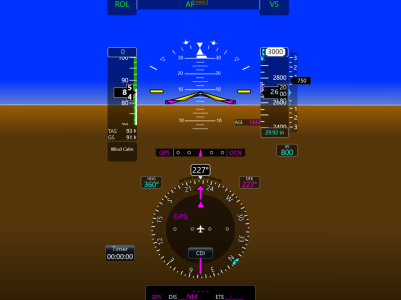
We’re excited to announce that the G600 is back and now available through our beta program in Hub version 1.2.6.
To access the G600 Basic PFD profile, please ensure you are running Hub version 1.2.6. Then, click the gear icon in the Hub and enable Beta Releases. After restarting the Hub, you’ll see a new profile titled “G600 Basic.”
FlightSimBuilder Hub
Download the latest version of the launcher: FSBHub v1.27 1.27- Bug fixes for G600Txi Profile 1.26 Highlights:- G600 Basic PFD released via Beta (need to opt in for Beta in the Hub settings)
flightsimbuilder.com
Highlights
- This is a native profile and can be used with any aircraft—from a Cessna 152 to a fighter jet
- Full-screen G600 display (no top or bottom bars)
- Hardware buttons are now functional (e.g., use ALT to adjust altitude)
- We recommend pairing the G600 profile with the TDS GTN 750 profilefor full navigation and map functionality
- Use it in standalone mode (no pop-outs or cockpit integration required)
- Works across all aircraft
- No large multi-GB downloads required—everything is delivered through the Hub
- Speed tape automatically adjusts based on the aircraft you’re flying
- Autopilot (AP) annunciations are working for most modes (see limitations below)
Current Limitations (Basic PFD)
- This lightweight native profile does not include maps or synthetic vision, but it also avoids additional downloads
- In parallel, we are working on bringing the full G600 TXiexperience to the Tnxi system
- More details to come in the future (timeline may be up to a year or longer)
- We will continue enhancing the Basic version in the meantime
Work in Progress
- AP annunciations are not fully accurate in all cases
- Example: HDG mode may display as ROL, although the AP is correctly flying HDG
- We are actively working with the TDS team to resolve these issues
We Need Your Feedback
Please test the G600 Basic profile this week as we prepare for a public release (targeting this or next week). Let us know if any issues.
We’d also love to hear what features you’d like to see next. Our current priorities include:
- Resolving AP annunciation issues when used with the TDS GTN 750
- Enabling touch interaction (e.g., entering ALT, VS, etc.)
