

CarbonCopyAviation
New member
When Using the GNS from cold and dark you will need to turn the GNS530 on, this is normally (on the game / real) done by turning the .C on the top left of the unit, the FlightSimBuilder GN530 is a button and not a rotary encoder, so to make this work i did the following:
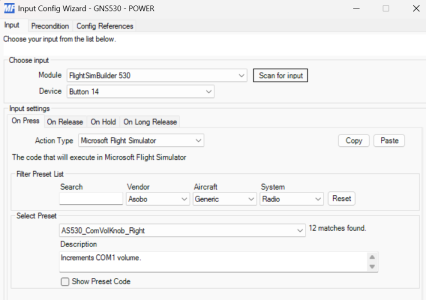
Choose Input
Module: FlightSimBuilder 530
Device: Button 14
Input Settings On Press
Action Type: Microsoft Flight Simulator
Select Preset: AS530_ComVolKnob_Right
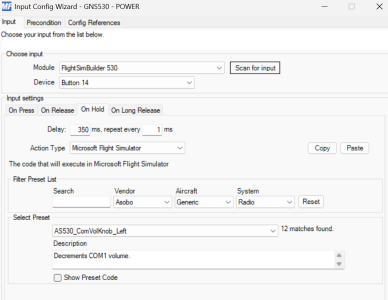
Input Settings On Hold
Delay: "350ms", repeat every "1ms"
Action Type: Microsoft Flight Simulator
Select Preset: AS530_ComVolKnob_Left
Choose Input
Module: FlightSimBuilder 530
Device: Button 14
Input Settings On Press
Action Type: Microsoft Flight Simulator
Select Preset: AS530_ComVolKnob_Right
Input Settings On Hold
Delay: "350ms", repeat every "1ms"
Action Type: Microsoft Flight Simulator
Select Preset: AS530_ComVolKnob_Left
Attachments
Last edited: