G600 Txi Feedback

Administrator

Administrator
Staff member
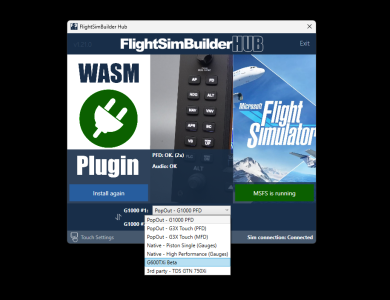
This post is dedicated to collecting your feedback, bug reports, and enhancement requests for the newly released G600Txi profile for the FlightSimBuilder G1000 TNxi multi-profile system.
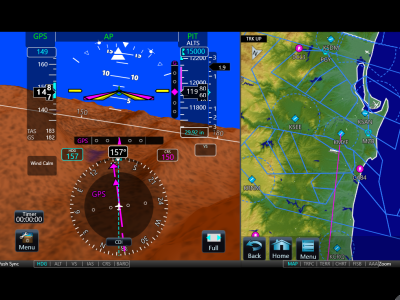
Screenshot 2025-11-21 164355.png
Screenshot 2025-11-21 160340.png
 
A new update has been released that addresses many of the reported G600TXi issues.

Please start the FlightSimBuilder Hub and accept the update prompt, or download the latest version directly from our website using the link below:

Once updated, please let us know if this resolves the issues you were experiencing. We appreciate your feedback and are happy to assist further if needed.

The feedback for the prior beta has been moved and archived to clean the space and avoid confusion. Please make sure you have the latest version of the Hub and provide feedback for 1.24 version
 
Last edited:
The G600 isn't working for me either at the moment (Waiting for Simulator screen). I'm sure it will get sorted eventually though. My question is that when it does, am I right in thinking it includes charts, and so wont need a navigraph subscription to work?
No, no need for any subscription, it comes with your purchase of FlightSimBuuilder hardware and it does include charts.
 
@Michaelh @Preyedplanet8 can you try restarting the hub? If still no luck, can you try changing profile and then returning back to G600? Please let us know how it goes
I have tried both - no change. I do get a message about a 'new version of EZS TXi is available' with option to update.

I tried the update option, no change to "stuck on Navigation data installed" and when I close/restart the launcher, I still get the message that the new EZS version is available.
 
Please make sure you have the latest version of the Hub and provide feedback for 1.24 version.

Is this still a BETA version? Or a final release.

Thank You.

Bill McCracken
 
Seems to be working consistently for me however a couple things. Flight plan, Traffic, Terrain, Weather, music, system are all grayed out, only map charts and waypoint are accessible. Also charts don't seem to be working or working well. Once in a while one will show up.
 
Subject: Pre-Release Hub Update – Request for Testing and Feedback

Hi everyone,

We have a new pre-release coming up and wanted to share it with this group to see whether it addresses the issue you’ve been experiencing. If you still encounter problems after installing it, please share a screenshot of the screen where you get stuck so we can troubleshoot more effectively. Also, let us know if you’re okay with one of our engineers working directly with you to diagnose the issue.

Below are the steps to install the pre-release version:

Pre-Release Installation Instructions
  1. Uninstall the FSB Hub.
  2. Manually delete the following two folders (if they exist):
    • %ProgramData%\FlightSimBuilder
    • %ProgramData%\EZSims
  3. Download the pre-release Hub from the link below:
    https://www.mediafire.com/file_premium/r998ztjjoh5tyje/FSBLauncher_g600txi.zip/file
  4. Unzip the file and install the Hub.
  5. If prompted to update to another version, please decline the update.
  6. Start the Hub and select the G600 profile.
  7. The Hub will begin an approximately 8 GB download, so please allow some time for this to complete.
  8. If you still experience issues after the download finishes, try selecting another profile (for example, G1000) in the Hub, then switch back to G600.
We’re looking forward to your feedback and appreciate your help in getting this fully resolved.

Thank you,
Stan
 
Last edited:
A bit of confusion about what is happening, but something is now working.....
  • Uninstalled the hub using the uninstall exe in the folder
  • Deleted the two folders defined above
  • Downloaded the file from mediafire
  • Unzipped the file - surprised to find that that there was no exe install file for the Hub, just a folder 'G600Txi_Data_0_0_4' with a subfolder 'New Txi' (how would any new hub instal find this new datafile sitting in my downloads folder??)
  • In the absence of a new Hub installer exe, I had to instal the Hub from the FSB website
  • Loaded MSFS 2024, Cessna, and selected G600TXi Beta from the hub
  • Big download as forecast, with a window appearing on the G1000 but still stuck on "Navigation Data Installed"
  • However, using alt-tab to find open windows, there is a new window for the G600 (this didn't happen before)
  • Selected this new G600 window and it immediately jumps to the G1000 screen, filling the whole monitor
  • Tested the functionality and some things worked, no charts though
  • Note that the stuck "Navigation Data Installed" window still shows as an unselected window but it disappears when hitting the cross
  • The G600 now seems to change to wide format and doesn't fill the monitor, also the G600 doesn't seem to work anymore
  • Selected different profile and returned, no G600 window at all
  • Closed and reopened the hub and G600 is back with the same working functionality as before with "PFD" data as in the sim
  • The "Navigation Data Installed" window seems to be generated every time but can be closed
Without knowing what functionality is available at this stage, it is difficult to know if it is working correctly, my only observation is that the image format seems to be 'widescreen' so I have bands of my desktop image above and below.

Hope this helps!
 
Further to my previous post it seems that when switching panels, I have to restart the hub to get the G600 to appear.

The G1000 panel then shows the stuck window, but the G600 window is there to select with alt-tab
The G600 window then moves to the G1000 with black bars at the top and bottom, but closing the "stuck" window allows the desktop image to show through.
 
Following the same process as before - uninstalling the hub, deleting the folders and downloading the new launcher, I ran the installer.

Entering a flight and selecting the G600, it now correctly opens on one of my G1000 panels.

Alt-tab reveals that the "stuck screen" is still there, now showing "launching avionics" with the sliding green bar.
This window is providing the black background to the G600 display and if the window is closed, my desktop shows through top and bottom.

The PFD side of the G600 seems to work OK, but charts/select does not allow selection of any airport other than the default KMYF

(FYI the launcher folder shows FSBLauncher-0.0.217.197 with the FSBLauncher.exe file dated21/01/2026 15:34)
 
Question about the charts. One i select a chart there does not seem to be a way to go back to a different chart. The CLR button does nothing and the rotary knob also does nothing. If I select home then go back to charts the chart i selected previously is still there and no way to select a different chart. Is this a known bug or is there a button or combination of buttons I'm not using?
 
1.24 is still a beta. Has there been an official release yet?

I had problems with other beta releases. Had to get expert support to fix it. That is why I keep asking for an official release.

Thank You.

Bill McCracken
 
Back
Top